Built for the trades. Ready for your day.

Less admin.
More business.

Jobs, quotes, invoices and everything in between. Keep your business moving, from the first enquiry to the final payment.

Free to start. No account needed. iPhone & iPad.
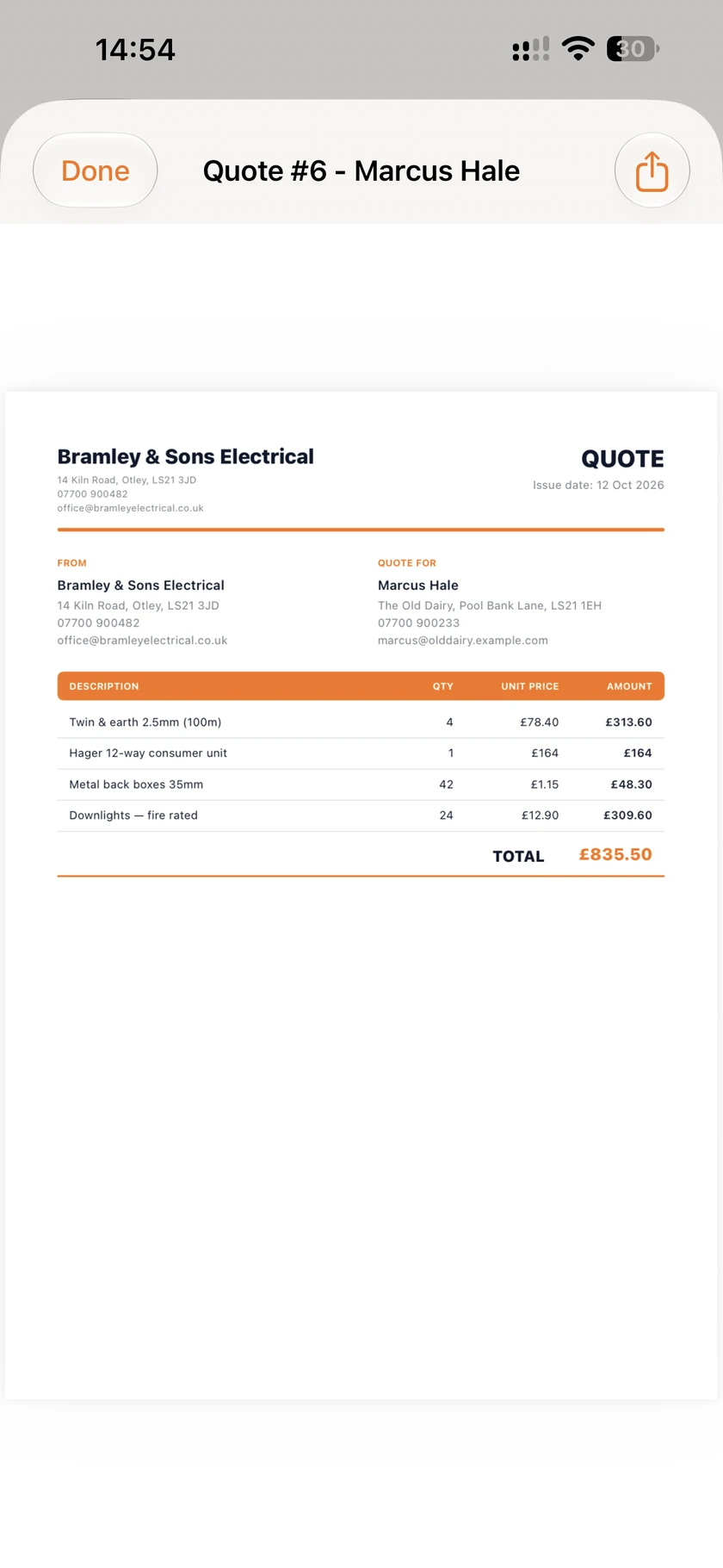
A branded quote made in BusinessFlow
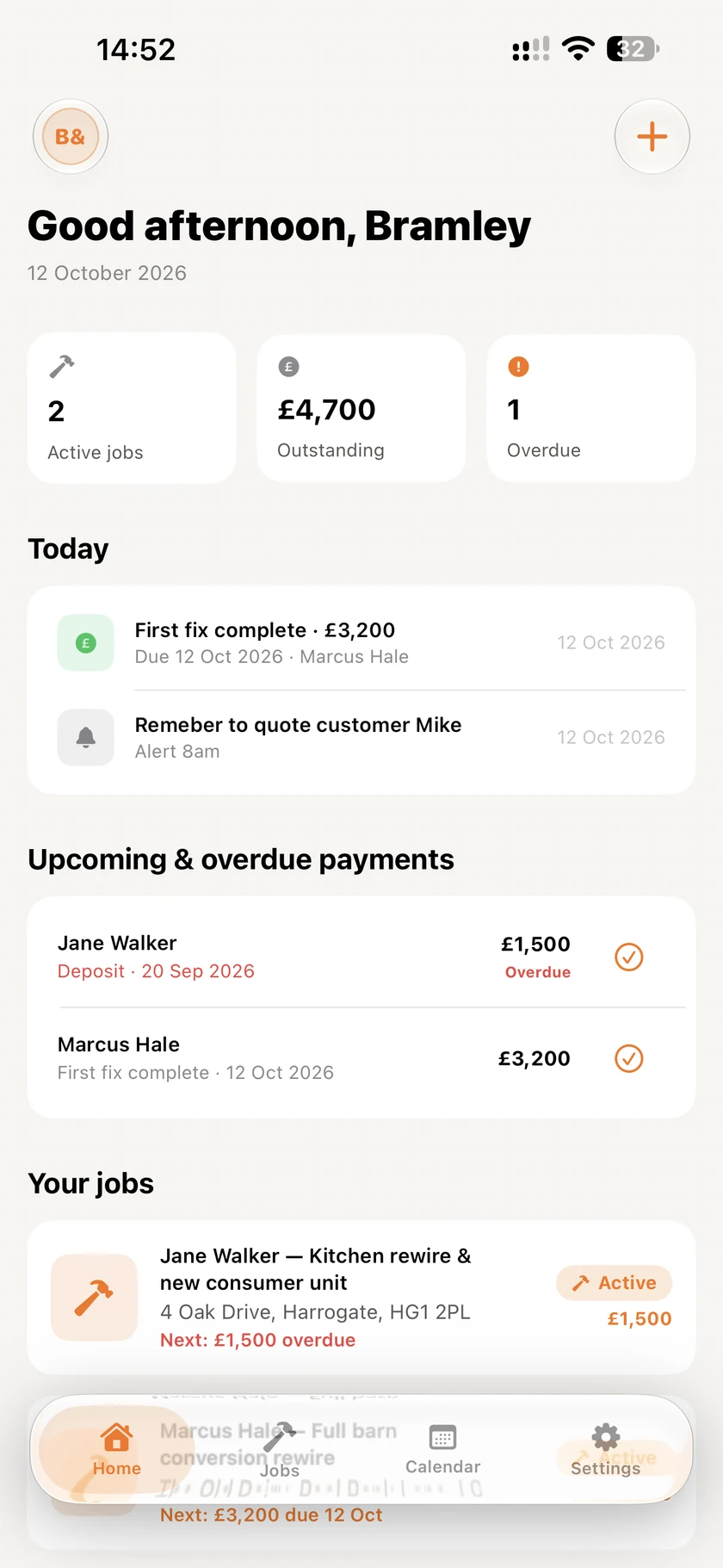
BusinessFlow dashboard showing active jobs, upcoming tasks and outstanding payments

Every jobEvery documentOne app

Your business, a little more together.

Built for your working dayiCloud backup includedYour brand on every document

From the first quote.
To the last payment.

Keep the important details together. Your customer's address, the agreed work, the paperwork and the money still to come in. Less searching. A clearer next step.

01 / ORGANISE

Bring the job together.

Customers, addresses, notes and job details, all in one place.

02 / QUOTE

Make it professional.

Send clear quotes and invoices that carry your own branding.

03 / AGREE

Put it in writing.

Build your contracts, set out the terms and capture a signature.

04 / TRACK

See what's still owed.

Track deposits, staged payments and anything overdue.

A clearer view.
A calmer working day.

Explore the real app. Choose a screen to see how BusinessFlow keeps your work connected.

01 / OVERVIEW

Your day. All laid out.

Start with a clear view of active jobs, today's tasks and upcoming or overdue payments. Know what needs your attention before you head out.

  • Today's work and reminders
  • Upcoming and overdue payments
  • Active jobs at a glance
BusinessFlow dashboard showing jobs, tasks and payments

Some features require VIP. Screens show example business data.
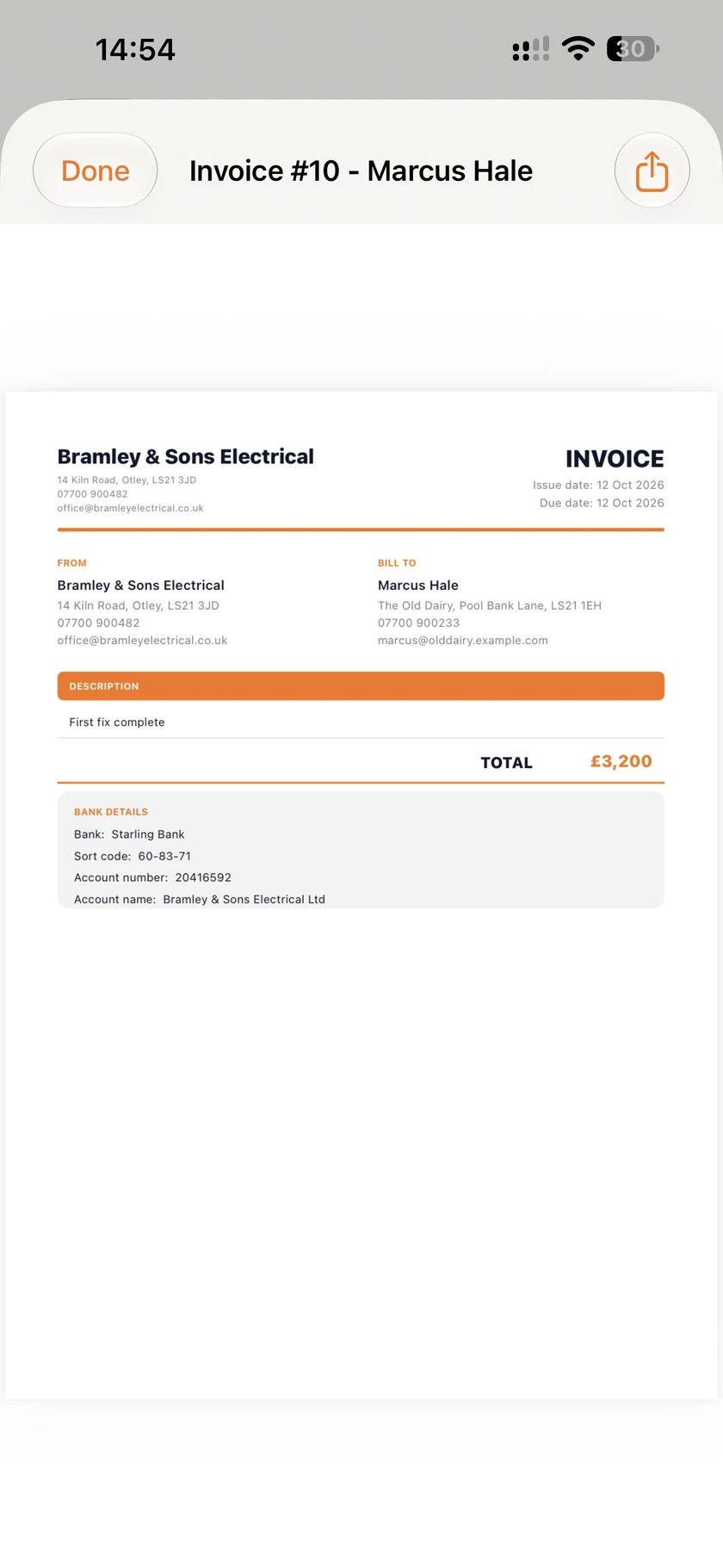
A branded invoice created in BusinessFlow
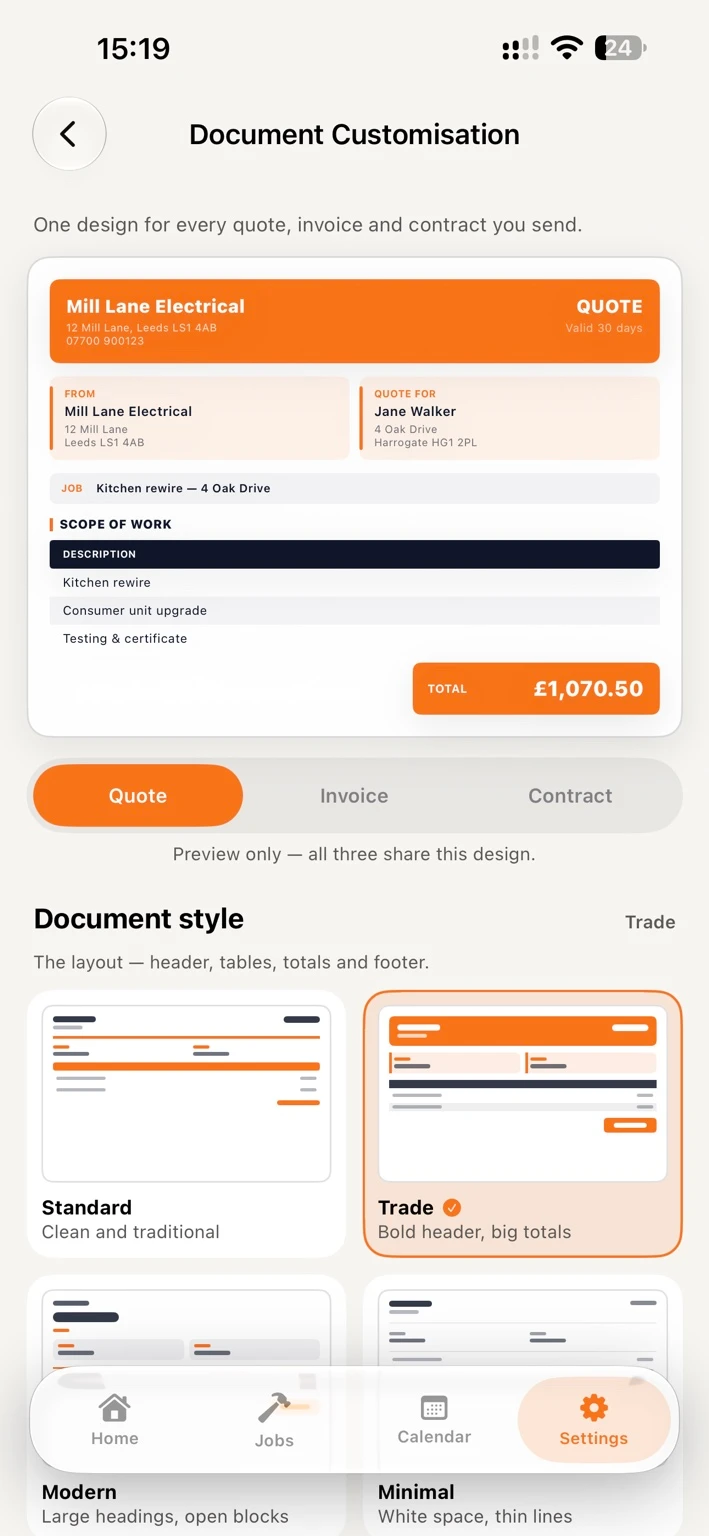
Document customisation with Standard, Trade, Modern and Minimal styles

Your name. Your colours. Your paperwork.

Your work speaks
for itself.
So should your
paperwork.

Give your quotes, invoices and contracts a look that belongs to your business. Choose a document style, add your logo and make the colours your own.

  • Document styles to match your business
  • Your logo and colours, carried through
  • Customisable contracts and signatures

The practical side.
Taken care of.

Tasks, kept in check.

Keep a job's to-do list with the job itself. Tick things off as you go and see what's still left to do.

Details, remembered.

Keep measurements and site notes close to hand. Track materials, quantities and costs without a separate list.

Quantities, worked out.

Turn your measurements into volumes, tonnages and bag counts. Adjust the figures to match your supplier.

Your work.
Your device.
Your peace of mind.

No account to create. No business data on our servers. Your work stays on your device, with backup to your own iCloud account on every plan.

Read the privacy policy
  • On your device.

    Your jobs, documents and customer details are stored locally, right where you need them.

  • Backed up to your iCloud.

    Keep your work backed up and in sync across your own iPhone and iPad. Included with the free plan.

  • Private by design.

    No analytics, advertising networks or third-party trackers in the app. We never see your business data.

Start with a job.
Take it from there.

Download BusinessFlow and try the core workflow for free. Upgrade to VIP when you need more from your working day.

Download on the App Store
Get going

Free.

  • Jobs and customers
  • Quotes and invoices
  • iCloud backup
  • No account needed

5 invoices and 1 quote per year.

Keep moving

VIP.

  • Unlimited quotes & invoices
  • Contracts
  • Reminders & Calendar sync
  • Home-screen widgets

Monthly and yearly subscriptions.

View current VIP pricing in the app. Subscriptions and billing are handled by Apple.

Frequently asked questions

Can't find your answer? Email lukerjowen@gmail.com — a real person reads every message.

How does iCloud backup work?+
Your jobs, quotes, invoices and contracts back up to your own iCloud account on every plan, free included, and sync across your own iPhone and iPad devices. The data passes through Apple's iCloud — it is never stored on or seen by our servers. Make sure you're signed in to the same iCloud account on each device and that iCloud is enabled in Settings. You can check the status any time under Settings › Data & backup in the app.
What does the free version include?+
You can download and use BusinessFlow free of charge for its core workflow — jobs, quotes and invoices — with iCloud backup included. The free plan covers 5 invoices and 1 quote a year; VIP removes those limits and unlocks the extras, including contracts, reminders, Apple Calendar sync, team access and home-screen widgets. There's no account to create and no card details are ever shared with us — everything goes through Apple.
How do I cancel my subscription?+
Open the App Store app, tap your profile picture, choose Subscriptions, select BusinessFlow and tap Cancel Subscription. You'll keep VIP access until the end of the current billing period. Cancelling in the App Store always works — there is no separate account with us to cancel.
How accurate is the materials calculator?+
It works out a tonnage or bag count from the volume you measure, using standard industry average densities — concrete at 2.4 t/m³, MOT Type 1 at 2.1 t/m³ compacted, and so on. Real materials vary with moisture, grading and supplier, so a merchant's own calculator may differ slightly for the same measurements. Every density and bag weight can be changed under Settings › Job Toolkit › Aggregate densities to match your supplier. Bag counts always round up, and it's worth checking quantities with your supplier before placing an order.
How do I get a refund?+
Refunds are handled by Apple. Go to reportaproblem.apple.com, sign in with your Apple ID, find the BusinessFlow purchase and choose Request a Refund. Apple reviews and processes these requests directly.
What happens to my data if I delete the app?+
Deleting the app removes all locally stored data from your device. Your backup remains in your own iCloud, so reinstalling the app on the same Apple Account brings your work back — there's a Restore from iCloud option on the first screen. To remove the backup as well, use Settings → [Your Name] → iCloud, or erase it from inside the app under Settings › Data & backup. Because we never hold copies of your data on our servers, there's nothing to request from us and nothing to delete on our side.
How do I contact support?+
Email lukerjowen@gmail.com with as much detail as you can — what you were doing, what you expected and what happened. Include your device model and iOS version if the issue is technical. We aim to reply to every message.

BusinessFlow for iPhone & iPad

Good work deserves
a better workflow.

Your next job, a little more organised.

Download on the App Store
Privacy policy View the full policy

Privacy Policy

The short version: we don't collect your data. The full version is below.

Last updated: 16 September 2026 App: BusinessFlow for iOS Operator: Luke Owen

1. Introduction

This policy explains how BusinessFlow ("the App", "we", "us") handles information. It applies to the BusinessFlow iOS application published on the Apple App Store. By using the App you agree to this policy.

2. What we collect

Nothing. The App does not collect, transmit, sell or analyse your personal data. Specifically, the App contains:

  • No analytics or telemetry of any kind;
  • No advertising identifiers and no ad networks;
  • No third-party trackers, SDKs or cookies;
  • No account registration — we never learn your name, email address or location.

3. Data stored on your device

Everything you create in the App — clients, jobs, quotes, invoices, payments and contracts — is stored locally on your device, and backed up to your own private iCloud database (see section 4). Deleting the App deletes this local data.

4. iCloud backup and sync

The App backs up your work to your own iCloud account on every plan, including the free one. Losing a year of paperwork because a phone was replaced is not something we think anyone should have to pay to avoid. While iCloud is available on your device:

  • Your data is transferred and stored by Apple under Apple's Privacy Policy, in a private database only your Apple Account can read;
  • The sync happens between your devices and Apple's iCloud — we never receive, access or view your data;
  • Reinstalling the App on the same Apple Account restores your work;
  • You can turn iCloud off for the App at any time in iOS Settings, and the App carries on working with your data stored on the device only.

5. Payments and subscriptions

Subscriptions are sold exclusively through Apple's in-app purchase system and the App Store. We never receive your payment details, card number or billing address — Apple processes the entire transaction. If you have a billing question, refund request or want to cancel, see the Support section below or contact Apple directly.

6. Children

The App is a business tool intended for adults and is not directed at children under 13. Because the App collects no data at all, no information about any user — including children — is gathered or stored by us.

7. Data deletion

You are always in control of your data:

  • Inside the App: Settings › Data & backup can erase your data from this iPhone, or from this iPhone and your iCloud together.
  • Local data: deleting the App from your device permanently removes all locally stored data.
  • iCloud data: deleting the App's data from iCloud via iOS Settings → [Your Name] → iCloud removes it from Apple's servers.
  • There is nothing to request from us — we hold no copies of your data on any server.

8. Measurements and the materials calculator

The measuring tools and the materials calculator are working aids, not a substitute for your own judgement on site. Areas and volumes are calculated from the figures you enter, so a mistyped dimension or the wrong unit will produce a wrong answer.

The calculator converts a volume into a tonnage or a bag count using standard industry average densities. Real materials vary with moisture, grading, compaction and supplier, and a merchant's own calculator may give a slightly different figure for the same measurements. Every density and bag weight is editable in the App under Settings › Job Toolkit so you can match your own supplier's figures.

Always check quantities against your supplier before ordering. We are not liable for material that is over-ordered, under-ordered or unsuitable for the work.

9. Changes to this policy

If we change this policy, the updated version will be posted on this page with a new "last updated" date. Continued use of the App after changes constitutes acceptance of the revised policy.

10. Contact

Questions about this policy or your data? Email us at lukerjowen@gmail.com and we'll get back to you.